
Simple Word Book1.7.0 - Get APK
You'll be able to download in few seconds.
Publisher Description
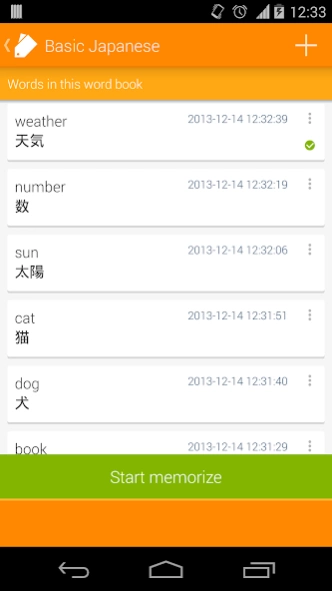

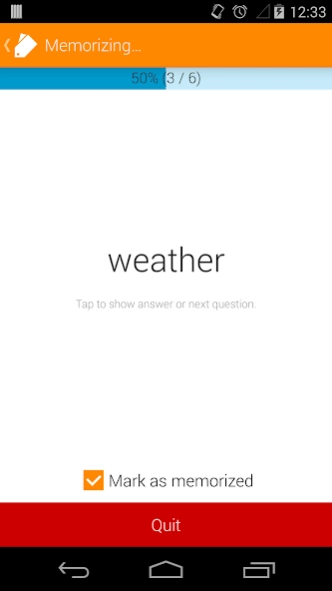
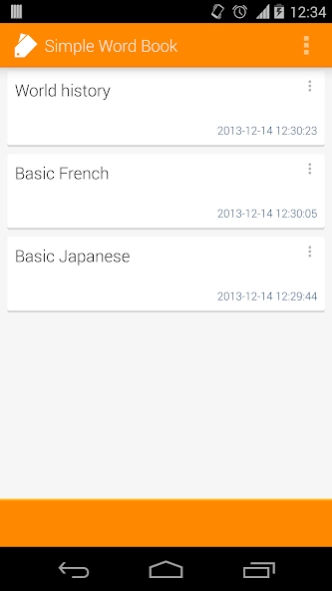
Word book app to manage your word books and test your vocabulary
Simple word book app✔You can register multiple word books.
✔You can import words from files: tab delimited, CSV.
✔There is no limitation about number of words in a word book.
About permissions
・This app uses Internet access permission to show ads.
・This app uses reading storage permission to import words from files on the external storage.
File format for import
■Charset
Shift_JIS or UTF-8
■形式
Write word and answer(meaning) in 1 line delimited with one of the "Available delimiters".
e.g.
word1[delimiter]answer1
word2[delimiter]answer2
word3[delimiter]answer3
:
■Available delimiters
Tab or comma
How to import
1. Put some word files on your device.
2. Select your file using some third party app such as ES File Explorer.
* ES File Explorer File Manager:
https://play.google.com/store/apps/details?id=com.estrongs.android.pop
3. Tap "Import to word book".
4. The import screen will be opened.
If you have any troubles, adjust charset and delimiter settings from "Settings" screen.
5. Tap the destination word book, then the words will be imported.
* You can also create new word book for imported words.
Follow the updates
Google+
https://plus.google.com/u/0/114542232871046503427
https://twitter.com/sika_app
About Simple Word Book
The company that develops Simple Word Book is sika524. The latest version released by its developer is 1.7.0.
To install Simple Word Book on your Android device, just click the green Continue To App button above to start the installation process. The app is listed on our website since 2018-04-05 and was downloaded 0 times. We have already checked if the download link is safe, however for your own protection we recommend that you scan the downloaded app with your antivirus. Your antivirus may detect the Simple Word Book as malware as malware if the download link to com.sika524.android.tangocho is broken.
How to install Simple Word Book on your Android device:
- Click on the Continue To App button on our website. This will redirect you to Google Play.
- Once the Simple Word Book is shown in the Google Play listing of your Android device, you can start its download and installation. Tap on the Install button located below the search bar and to the right of the app icon.
- A pop-up window with the permissions required by Simple Word Book will be shown. Click on Accept to continue the process.
- Simple Word Book will be downloaded onto your device, displaying a progress. Once the download completes, the installation will start and you'll get a notification after the installation is finished.
Program Details
System requirements
Download information
Pricing
Version History
version 1.7.0
posted on 2018-04-05
- Added folder feature
- Added Google Drive backup/restore feature
- Fixed a bug that selection is reset while scrolling list view in selection mode
version 1.5.0
posted on 2017-08-15
- Added a setting to sort wordbooks
- Added a setting to change text align in memorize screen
- Added a feature to mark words as your "weak point"
- Modified "edit word" screen to focus on "surface" text field
- Fixed "edit word" screen that window closes even when there is input errors
- Fixed "edit word" screen to show warnings on tapping left arrow icon or back key
- Modified "settings" screen to show current settings
- Modified UI design
version 1.1.0
posted on 2014-10-13
- Added backup and restore feature(experimental).,- Added ability to scroll to memorize screen when the word/answer are long.,- Other minor improvements.
Disclaimer
External Download
We do not host Simple Word Book on our servers. We did not scan it for viruses, adware, spyware or other type of malware. This app is hosted by Galad and passed their terms and conditions to be listed there. We recommend caution when installing it.
The APK Download link for Simple Word Book is provided to you by apps112.com without any warranties, representations or guarantees of any kind, so access it at your own risk.
If you have questions regarding this particular app contact the publisher directly. For questions about the functionalities of apps112.com contact us.
